API CONNECTION / CONFIGURATION
Configuration guide.
Set the endpoint, choose a model, and send a text request. Your existing OpenAI SDK can use the prixis Chat Completions endpoint.
Quick setup
- 01
- 02
Set two values
Use your prixis key and this base URL:
https://prixis.dev/v1 - 03
Choose your model
The first request defaults to GPT-6 Astra. Your $3 free balance can start any model while funds are available.
OPENAI_BASE_URL=https://prixis.dev/v1
OPENAI_API_KEY=your_prixis_api_key
An .env file must be loaded by your application. For a terminal session, use the commands below.
Environment variables
Replace the placeholder with the key you copied from prixis. Set these values in the process that runs your app. Keep the key on your server.
export OPENAI_BASE_URL="https://prixis.dev/v1"
export OPENAI_API_KEY="your_prixis_api_key"
After changing a deployment secret, restart or redeploy the app so its process receives the new value.
Your first request
Use a unique request ID for each new generation. Keep the same ID and request body when retrying that generation.
GPT-6 Astra · Charges settle from actual completed token usage. prixis reserves available prepaid balance while the request runs.
Install the SDK with pip install openai.
from openai import OpenAI
import os
import uuid

client = OpenAI(
    api_key=os.environ["OPENAI_API_KEY"],
    base_url=os.environ["OPENAI_BASE_URL"],
    max_retries=0,
)

request_id = str(uuid.uuid4())
reply = client.chat.completions.create(
    model="gpt-6-astra",
    messages=[{"role": "user", "content": "Explain this in one line."}],
    extra_headers={"Idempotency-Key": request_id},
)
print(reply.choices[0].message.content)
Check the response, then open your console to see the actual input, cached input, output tokens and final charge.
Models & reasoning
The exact model ID selects the model for a request. Choose low, medium or high with reasoning_effort; leaving it out uses medium.
| Model ID | Input | Cached | Output |
|---|---|---|---|
gpt-6-astra | $5.5 | $0.55 | $27.5 |
gpt-5.6-sol | $2.2 | $0.22 | $11 |
gpt-5.6-terra | $1.1 | $0.11 | $6.6 |
gpt-5.6-luna | $0.11 | $0.011 | $0.66 |
gpt-5.5 | $2.75 | $0.275 | $16.5 |
USD per million tokens. Input usage may include service instructions. Reasoning tokens count toward output usage.
Retries & billing
The Idempotency-Key belongs to one generation, including its retries. Reusing it with changed messages or a changed model returns a conflict. A completed request replays its saved result and does not charge again.
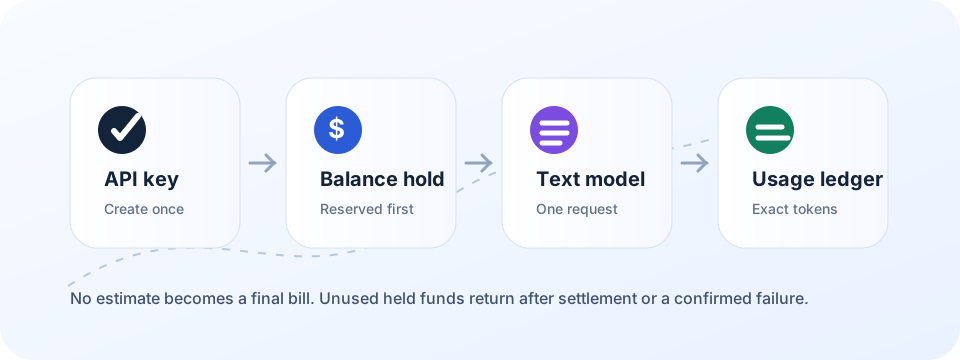
While an execution remains uncertain, its prepaid reserve remains pending. Check the request in your console before sending a replacement. Unused reserved funds return to your available balance after settlement or a confirmed failure.
Streaming keeps the connection open while the request runs, then sends the completed answer as SSE. It does not deliver tokens incrementally.
Client compatibility
| Client / protocol | prixis support |
|---|---|
| OpenAI SDK · Chat Completions | Text messages; Python and cURL examples above |
| Images, audio and tool calls | Not supported by this endpoint |
| Structured-output schemas / sampling controls | Not supported by this endpoint |
| Codex CLI · Responses API | Not currently supported |
Current Codex custom providers require the Responses protocol. A base URL change alone cannot make a Chat Completions-only service work with Codex. Check the official provider configuration reference before using Codex-specific providers.
Codex advanced settings
These settings apply to Codex itself. They do not add endpoint support to prixis. Use the official reference for the complete configuration options.
Profiles and overrides
Keep named configurations for different tasks.
Custom model providers
Configure provider identity, authentication and transport.
Project configuration
Control where project settings are discovered.
Approvals and sandboxing
Choose command approvals and file or network access.
Shell environment
Control which environment variables child commands inherit.
Hooks
Attach commands to supported lifecycle events.
MCP servers
Connect tools through the separate MCP configuration.
Telemetry
Choose whether and where diagnostic events are exported.
Troubleshooting
| What you see | What to check next |
|---|---|
| Invalid or revoked key | Create a new key in your console and update the running app’s environment. |
| Insufficient balance | Add funds, or wait for active requests to settle and release unused reserved balance. |
| Request conflict | Keep the original body when retrying; use a new ID for a genuinely new generation. |
| Unsupported option | Remove tools, images, audio, sampling or output limits. Send supported text messages. |
| Request still pending | Check its existing record in the console and preserve its request ID. |